ChatGPT guide 02 of 4 · Free to read online Get the free PDFs

GUIDE 02 / SKILLS & PLUGINS

ChatGPT Connections Guide

Reuse your best instructions. Connect the tools you already use.

Connect a plugin

Adds tools, app connections, and reusable skills.

  1. Step 1
    Open Plugins
  2. Step 2
    Install → connect.
  3. Step 3
    Start a new chat.
    Type @ to select it.
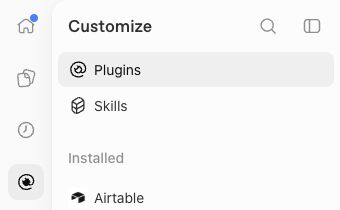
Actual ChatGPT sidebar with Plugins selected

ChatGPT web · Plugins in the left sidebar

MORE PLUGINS TO EXPLORE

QuickBooks logoQuickBooks

Canva logoCanva
Shopify logoShopify
Mailchimp logoMailchimp
Stripe logoStripe
Slack logoSlack

Try a connected tool

Email

Gmail or another supported service

“Build a timeline of emails about the kitchen renovation. Link the emails.”

Files

Google Drive or another supported service

“Compare these two project plans. List what changed and link both files.”

Calendar

Your connected calendar

“List my calendar appointments for the next two weeks.”

COMBINE YOUR TOOLS

“Use this month’s email and project files to summarize progress. Show an email update here in chat for me to review.”

Skill

A prewritten prompt for a task you repeat.

IMPROVE YOUR SKILL

“Based on my feedback in this conversation, update the skill.”

$500 · 2-hour video call · 100% money-back guaranteeGetAIAgentSetup.com →
Wesley Higbee | Updated November 3, 2026Sources: Skills / Plugins

Keep a copy

Seven guides.
One useful reference set.

Save them to your files, print them for your desk, or keep them handy during your next assignment.

ChatGPT · 4 guides

  1. 01Prompting Guide
  2. 02Connections Guide
  3. 03Model Guide
  4. 04Advanced Guide

Claude · 3 guides

  1. 01Prompting Guide
  2. 02Plugins & Connectors Guide
  3. 03Model & Reasoning Cheat Sheet

All seven are free to read online. Sign up with your email to download the PDFs, plus a combined ChatGPT PDF.

Work with Wesley

Connect it. Configure it. Put it to work.

The guides explain the ideas. In the $500 setup, we connect your approved data and software, configure your AI, and practice a real task together. You leave with tested connections and instructions you can use again.